

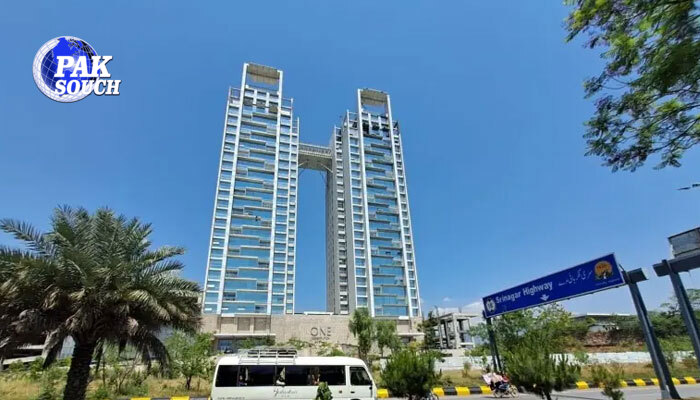
ISLAMABAD: A new legal development has emerged in the ongoing dispute surrounding apartments in the One Constitution Avenue project, as the new sub-lessee of an apartment previously owned by Pakistan Tehreek-e-Insaf (PTI) founder Imran Khan has approached the Islamabad High Court seeking to become a party to the case.
According to court documents, Shahid Naseer, who acquired Imran Khan’s apartment in Tower C of the prestigious One Constitution Avenue complex through a sub-lease arrangement, has filed an application before the court. He has jointly submitted the request with Zainab Ahsan, seeking permission to participate in the ongoing legal proceedings.
Request to Be Included in Intra-Court Appeal
The applicants have filed a miscellaneous petition in the Islamabad High Court requesting that five sub-lessees be formally included as appellants in the ongoing intra-court appeal concerning the One Constitution Avenue dispute.
In their application, the petitioners argued that the apartments in question were acquired legally and that they possess valid rights and interests that may be affected by the outcome of the litigation. They therefore requested the court to allow them to become parties to the case so they can protect their legal interests during the proceedings.
The petition emphasizes that the applicants are lawful sub-lessees and that any decision regarding the status of the project or its apartments could directly impact their ownership and occupancy rights.
Hearing Scheduled Before Division Bench
The Islamabad High Court has scheduled the miscellaneous applications for hearing on Wednesday. The matter will be heard by a division bench comprising Justice Azam Khan and Justice Inam Amin Minhas.
The court is expected to consider whether the sub-lessees should be granted standing in the intra-court appeal and whether their interests warrant formal representation in the ongoing litigation.
Legal observers note that the participation of sub-lessees could add another dimension to a case that has already attracted significant public and legal attention due to the involvement of high-profile property owners and regulatory authorities.
Existing Court Protection for Apartment Owners
The legal proceedings are taking place against the backdrop of earlier court orders that have provided temporary relief to apartment owners and sub-lessees.
Under the concept of third-party rights, the Islamabad High Court has already granted interim protection to appellants in the intra-court appeals. As a result, authorities have been restrained from evicting apartment owners and sub-lessees until further orders.
The stay order remains in effect, meaning residents and lawful occupants of the apartments cannot currently be removed while the litigation continues.
This protection has been viewed as particularly significant for individuals who purchased or acquired apartments in good faith and who argue that they should not suffer losses because of disputes involving developers, regulatory authorities, or lease agreements.
Background of the One Constitution Avenue Dispute
The One Constitution Avenue project, located in one of Islamabad’s most prominent and valuable areas, has been at the center of a prolonged legal battle involving the Capital Development Authority (CDA), apartment owners, and project stakeholders.
The controversy began after the CDA canceled the lease associated with the building’s construction, citing alleged violations and legal concerns related to the project.
The lease cancellation created uncertainty regarding the legal status of the building and raised concerns among apartment owners, investors, and occupants regarding their property rights.
Subsequently, the matter was challenged before the Islamabad High Court.
High Court Previously Upheld Lease Cancellation
In a major ruling, the Chief Justice of the Islamabad High Court previously upheld the CDA’s decision to cancel the lease, declaring the cancellation legally valid.
That judgment represented a significant victory for the CDA and reinforced the authority’s position regarding the project. However, affected parties later filed intra-court appeals seeking reconsideration of the decision.
Those appeals remain pending, and the litigation continues to evolve as additional stakeholders seek to join the proceedings.
Broader Implications
The outcome of the case could have substantial implications for property rights, lease agreements, and large-scale real estate developments in Islamabad. Legal experts believe the court will need to balance the authority of regulatory institutions with the rights of individuals who purchased or acquired property interests in the project.
For apartment owners and sub-lessees, the proceedings are critical because any final ruling could determine the future legal status of their investments and occupancy rights.
With fresh applications now before the court, the upcoming hearing is expected to play an important role in shaping the next phase of the One Constitution Avenue legal battle. The Islamabad High Court’s decision on whether to include the new sub-lessees as parties could influence how the broader dispute proceeds in the months ahead.
About The Author